


Hi there! How can we help you today?

Plugins
SH Variation Maestro
$16.00$18.00(In stock)
Bulk product variation generator with dynamic SKU and image assignment for fashion products.
Categories: Plugins
Bulk product variation generator with dynamic SKU and image assignment for fashion products.
Works with Botble CMS eCommerce plugin. No core file modification required.
Installation
- Copy the
sh-variation-maestrofolder into your Botble project'splatform/plugins/directory. - Go to Admin Panel → Plugins.
- Find SH Variation Maestro and click Activate.
How to Use
Step 1: Create or Edit a Product
Go to Products → Edit an existing product (the product must be saved first).
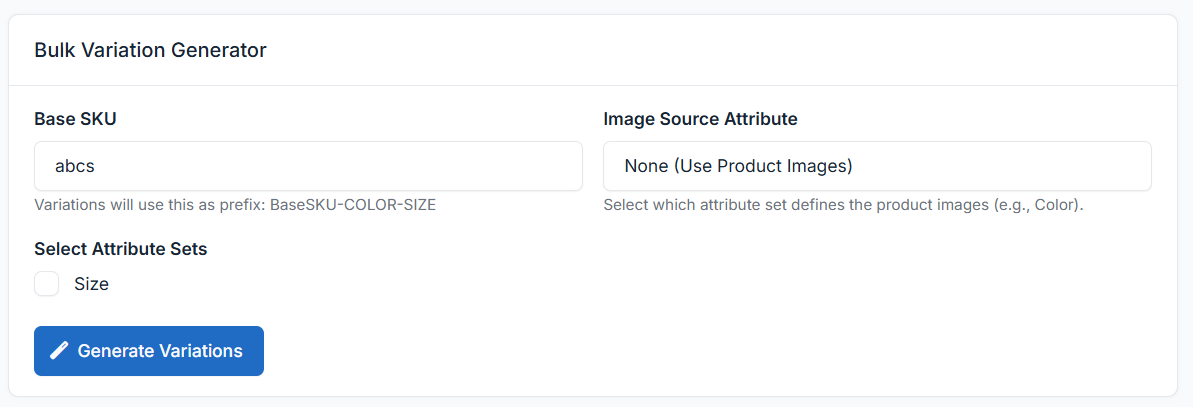
You will see a new meta box titled "Bulk Variation Generator" on the product edit page.
Step 2: Set Base SKU
Enter your Base SKU in the input field. This will be used as the prefix for all generated variation SKUs.
Example:
- Base SKU:
TD20ARN2 - Generated SKUs:
TD20ARN2-RED-S,TD20ARN2-RED-M,TD20ARN2-BLUE-L, etc.
If left empty, the product's existing SKU will be used as the base.
Step 3: Select Attribute Sets
Check the attribute sets you want to combine (e.g., Color, Size).
Once checked, a multi-select dropdown will appear for each set. Pick the specific values you want:
| Attribute Set | Selected Values |
|---|---|
| Color | Red, Blue, Navy, Green |
| Size | S, M, L, XL, XXL |
Click the "All" button next to any set to quickly select all its values.
A live counter will show how many variations will be generated (e.g., "Will generate 20 variations").
Step 4: Assign Images (Optional)
- From the "Image Source Attribute" dropdown, select which attribute set defines images (typically Color).
- Image cards will appear for each selected value.
- Click on a card to open the Media Manager and assign a specific image.
Example:
| Color | Image |
|---|---|
| Red | red-tshirt.jpg |
| Blue | blue-tshirt.jpg |
| Navy | navy-tshirt.jpg |
Variations will inherit the image of their matching color attribute.
Step 5: Generate
Click "Generate Variations".
- The plugin will create all combinations via AJAX (no page reload during generation).
- Duplicate combinations are automatically skipped.
- The page will reload after generation to show the new variations in the standard Botble variations table.
Example
Input:
- Product: Premium Cotton T-Shirt
- Base SKU:
TD20ARN2 - Colors: Red, Blue, Navy (3)
- Sizes: S, M, L, XL, XXL (5)
Output: 15 variations
| # | SKU | Variation |
|---|---|---|
| 1 | TD20ARN2-RED-S | Premium Cotton T-Shirt |
| 2 | TD20ARN2-RED-M | Premium Cotton T-Shirt |
| 3 | TD20ARN2-RED-L | Premium Cotton T-Shirt |
| 4 | TD20ARN2-RED-XL | Premium Cotton T-Shirt |
| 5 | TD20ARN2-RED-XXL | Premium Cotton T-Shirt |
| 6 | TD20ARN2-BLUE-S | Premium Cotton T-Shirt |
| 7 | TD20ARN2-BLUE-M | Premium Cotton T-Shirt |
| ... | ... | ... |
| 15 | TD20ARN2-NAVY-XXL | Premium Cotton T-Shirt |
Each variation inherits the parent product's price, weight, dimensions, stock settings, and status.
Important Notes
- Save the product first — The generator only works on the Edit page (not Create).
- Duplicates are skipped — Running the generator again with the same attributes won't create duplicates.
- Variations can be edited individually — After generation, use the standard Botble variations table to edit prices, stock, images, etc.
- Large batches supported — The generator handles 100+ combinations efficiently via optimized database queries.
Requirements
- Botble CMS v7.3.0+
- Ecommerce plugin (activated)
- Product attribute sets must be created first (Admin → Ecommerce → Product Attributes)
You may also like
Take it to your cart