


Hi there! How can we help you today?
Plugins
SH Weather Dashboard
$1.00$1.00(In stock)
Weather Dashboard brings the elements to your admin panel. This sophisticated plugin provides real-time weather updates and a detailed 7-day forecast directly on your Botble CMS dashboard. Perfect for site owners who need to keep local or global conditions in mind, it combines utility with a beautiful, modern interface.
Categories: Plugins
Weather Dashboard - Real-Time Meteorological Data for Botble CMS
Weather Dashboard brings the elements to your admin panel. This sophisticated plugin provides real-time weather updates and a detailed 7-day forecast directly on your Botble CMS dashboard. Perfect for site owners who need to keep local or global conditions in mind, it combines utility with a beautiful, modern interface.
Premium Features
- Real-Time Weather Updates: Get instant data on temperature, humidity, and atmospheric conditions.
- 7-Day Forecast: Detailed daily forecasts to help you plan your week ahead.
- Location-Based Data: Automatically detects or allows manual entry for any global location.
- Dynamic Visuals: Beautiful weather icons and background themes that change based on current conditions.
- Admin Dashboard Widget: A perfectly sized, high-impact widget designed for the Botble layout.
- Ultra Fast API: Optimized for speed to ensure your dashboard loads instantly.
Preview
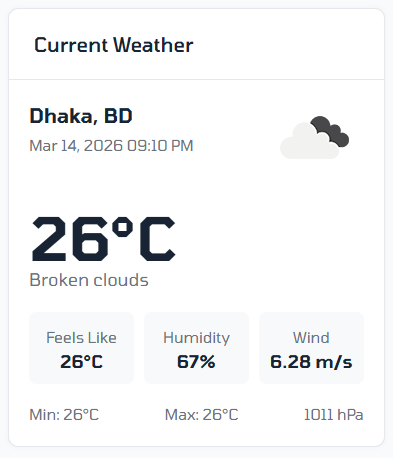
A stunning, high-contrast dashboard widget featuring large temperature typography, animated weather icons (sun, rain, clouds), and a clean horizontal scroll for the 7-day forecast.
Requirements
- Botble Core: Version
7.0.0or higher. - Weather API Key: Required (e.g., OpenWeatherMap).
- PHP:
8.1or higher.
Installation
1. Automatic Installation
- Go to your Admin Panel -> Plugins -> Add New Plugin.
- Search for Weather Dashboard.
- Click Install, then Activate.
2. Manual Installation
- Download the plugin from the marketplace.
- Upload the
weather-dashboardfolder toplatform/plugins/. - Go to Admin Panel > Plugins and click Activate.
How to Use
- Obtain a free API Key from OpenWeatherMap.
- Navigate to Admin Panel -> Settings -> Weather Dashboard.
- Enter your API Key and your preferred Location.
- The Weather Dashboard widget will now appear on your main dashboard screen.
- Hover over the forecast days for more detailed meteorological information.
Support
If you have any questions or need assistance, feel free to reach out via:
- Email: [email protected]
- Website:shakib.me
You may also like
Take it to your cart